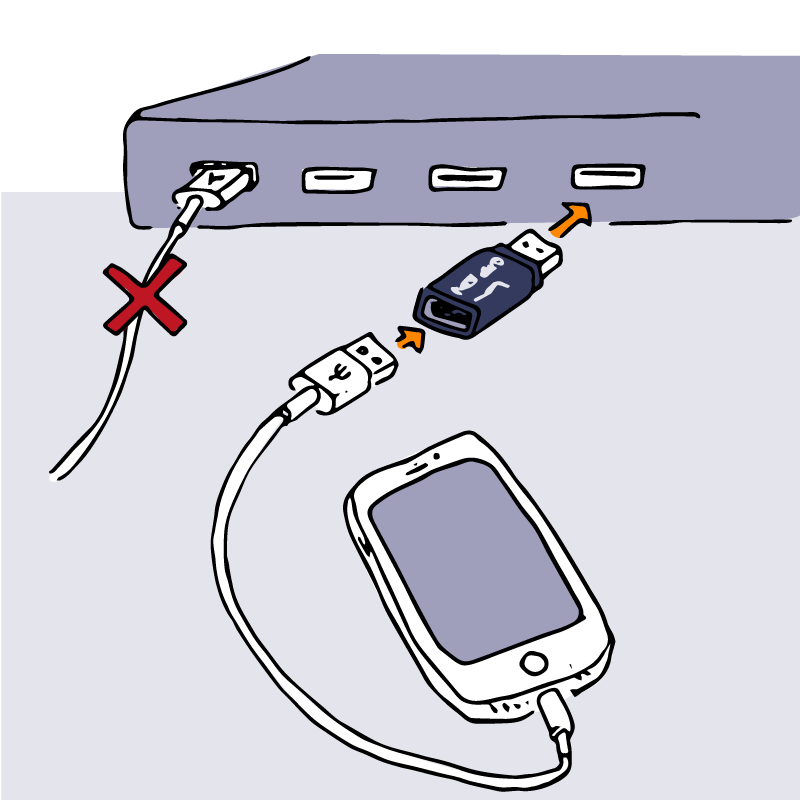

In today’s digital age, safeguarding your smartphone’s data is more crucial than ever. With the increasing reliance on public charging stations found in airports, cafes, and other public venues, the risk of data theft has become a pressing concern. This article explores the potential dangers of using public USB ports and introduces a cost-effective solution to protect your device from hackers.
Understanding the Risks of Public USB Charging Stations
When you plug your phone into an unknown USB outlet, such as those found in public charging stations, you expose your device to various security threats. One of the most significant risks is a tactic known as “juice jacking.” This method allows hackers to exploit USB ports to install malware on your device while it charges.
What is Juice Jacking?
Juice jacking refers to the malicious practice of using compromised USB charging stations to transfer malware to unsuspecting users’ devices. This technique has been a topic of concern for over a decade, as it poses a dual threat: while your device is charging, it may also be receiving harmful software.
In 2011, cybersecurity experts demonstrated the vulnerability of USB charging outlets at the DefCon convention. They set up a free charging kiosk, and over 300 attendees unknowingly connected their devices, only to receive a warning message about the potential risks. This incident highlighted how easily even tech-savvy individuals could fall victim to such attacks.
How Juice Jacking Works
The fundamental principle behind juice jacking is that USB connections serve two primary functions: transferring electrical power and enabling data exchange. While charging your device, hackers can exploit the data transfer capability to inject malware or steal sensitive information.
Although there have been no widespread reports of juice jacking incidents, the threat remains real. Government agencies, including the FBI, have issued warnings about the dangers of using public USB ports, emphasizing the need for caution.
Protecting Your Device: USB Blockers and Specialized Cables
Given the risks associated with public charging stations, it’s essential to take proactive measures to protect your smartphone. Experts recommend using USB blockers or specialized charging cables designed to prevent data transfer while allowing power to flow.
USB Blockers: A Simple Solution
USB blockers are small devices that can be plugged into a USB port to block data transfer. For instance, a popular option is the $15 USB blocker from Offgrid. These devices ensure that only electrical power passes through, effectively preventing any unauthorized data exchange.
- Cost-effective: USB blockers are relatively inexpensive, making them accessible for most users.
- Easy to use: Simply plug the blocker into the USB port before connecting your device.
- Portable: Their small size makes them easy to carry in your pocket or bag.
Specialized Charging Cables
Another option is to invest in specialized charging cables that lack data lanes. For example, the Plugable charging cable supports up to 240W of power draw while preventing data transfer. These cables are designed specifically for situations where you need to charge your device without the risk of data theft.
- High power output: Ideal for fast charging without compromising security.
- Durability: Often built with robust materials to withstand daily use.
- Versatility: Compatible with various devices, making them a practical choice for multiple users.
Debunking Myths: Is Juice Jacking a Real Threat?
While the concept of juice jacking raises valid concerns, there is ongoing debate about the actual prevalence of such attacks. Some cybersecurity experts argue that there is insufficient evidence to suggest that juice jacking is a widespread issue.
Expert Opinions on Juice Jacking
Cybersecurity professionals have varying perspectives on the threat of juice jacking. For instance, Zulfikar Ramzan, chief scientist at Aura, stated that while the concept is technically feasible, there is little evidence to support its occurrence in real-world scenarios. Similarly, Andy Thompson from CyberArk emphasized that while juice jacking is possible, it may not be a significant threat to the general public.
However, the lack of documented cases does not negate the potential risks. Cybersecurity expert Mike Grover noted that while juice jacking may not be a common occurrence, it remains a plausible threat that users should be aware of.
Best Practices for Charging Your Device Safely
To minimize the risk of data theft while charging your smartphone, consider the following best practices:
- Avoid public charging stations: Whenever possible, use your own charger and power outlet.
- Use a USB blocker: Invest in a USB blocker to ensure that only power is transferred to your device.
- Opt for specialized cables: Use charging cables that prevent data transfer while allowing power flow.
- Monitor your device: Keep an eye on your phone while it charges in public spaces to detect any suspicious activity.
- Stay informed: Keep up with the latest cybersecurity news to understand emerging threats and best practices.
Conclusion: Stay Vigilant and Protect Your Data
As technology continues to evolve, so do the tactics employed by cybercriminals. Juice jacking serves as a reminder of the vulnerabilities associated with public charging stations. By taking proactive measures, such as using USB blockers and specialized charging cables, you can significantly reduce the risk of data theft.
Ultimately, staying informed and vigilant is key to protecting your smartphone and personal information. Investing a small amount in protective gadgets can save you from potential headaches and security breaches in the future.
Frequently Asked Questions (FAQ)
What is juice jacking?
Juice jacking is a method used by hackers to exploit public USB charging stations to install malware on devices while they charge.
How can I protect my phone from juice jacking?
You can protect your phone by using USB blockers or specialized charging cables that prevent data transfer while allowing power to flow.
Are public charging stations safe to use?
Public charging stations pose a risk of data theft, so it’s best to avoid them or use protective measures if you must use them.
What should I do if I suspect my device has been compromised?
If you suspect your device has been compromised, disconnect it from the power source, run a security scan, and change your passwords immediately.
Is juice jacking a widespread problem?
While there is little evidence to suggest that juice jacking is a widespread issue, it remains a plausible threat that users should be aware of.


Leave a Comment